Next.js 15 에서 MSW 적용하기 (feat. GraphQL)
March 01, 2025
문제 배경
Next.js 15 + GraphQL 조합에서 msw(2.6.6.)를 적용하면 msw의 인터셉터 함수가 GraqphQL의 operation 함수를 가로채지(intercept) 못하는 문제가 발생한다.
아래의 글을 보면 어떤 문제가 발생하고 있는지 자세히 확인 할 수 있다.
https://github.com/mswjs/msw/discussions/1049
문제 해결 방법
GraphQL api를 가로챌 방법이 없으니 다른 방법을 고안해야했다(?)
그것은 바로, REST api의 POST 메소드를 활용해서 api를 가로채는 것이다.
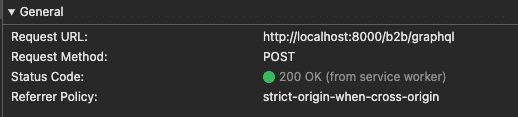
GraphQL api를 요청하는 방법을 생각해보면 하나의 endpoint에 POST 메소드를 통해서 요청한다. 그리고, 네트워크 탭의Payload 에서 확인하면 알 수 있듯이 operationName,
variables, query 를 통해 요청할 api 이름, 변수, 그리고 query 혹은 mutation field를 알 수 있다.
{
  "operationName": "Me",
  "variables": {},
  "query": "query Me {...}"
}-
src > mocks경로에 msw적용을 위한 값들을 세팅해준다.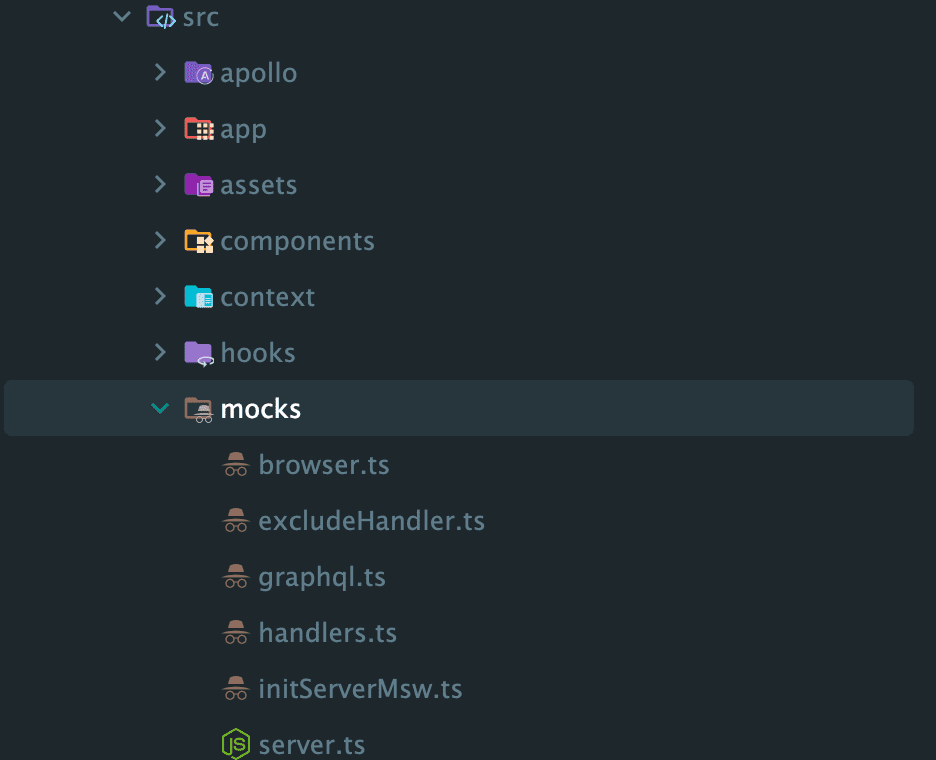
// browser.ts

import { setupWorker } from 'msw/browser';

import { handlers } from './handlers';

export const worker = setupWorker(...handlers);
// server.ts
import { setupServer } from 'msw/node';
import { handlers } from './handlers';
export const server = setupServer(...handlers);// initServerMsw.ts
export async function initServerMsw() {
if (typeof window === 'undefined') {
await (async () => {
const { server } = await import('./server');
server.listen();
})();
}
}여기까지는 msw공식 문서에서 확인할 수 있는 기본적인 세팅 방법이다. 하지만, 우리는 GraphQL 요청들만 모킹할 수 있도록 추가적인 세팅을 해줄 필요가 있다.
우선, GraphQL과 관련없는 GET 메소드의 함수들은 모두 무시하도록 excludeHandler함수를 추가했다.
// excludeHander.ts

import { http, passthrough } from 'msw';

export const excludeHandlers = [ http.get('*', () => passthrough()) ];
그리고, 최종적으로 아래와 같이 gqlHandlers에 필요한 handler를 추가하면 필요한 함수들만 모킹해주는 것을 확인 할 수 있다.
// handler.ts

import { excludeHandlers } from './excludeHandler';
import { gqlHandlers } from './graphql';

export const handlers = [ ...excludeHandlers, gqlHandlers({}) ];
마지막으로, 핵심 로직인 gqlHandlers의 내부를 살펴보도록 하자.
1. parseRequestBody 함수
async function parseRequestBody(request: Request) {
  try {
    const clonedRequest = request.clone();
    return await clonedRequest.json();
  } catch (error) {
    console.error('[MSW] Failed to parse JSON:', error);
    return null;
  }
}-
Request 복제:
request.clone()을 통해 원본 Request 객체를 복제합니다.- Request 객체의 body는 한 번 읽으면 다시 사용할 수 없기 때문에, 복제본을 사용하여
json()을 안전하게 호출합니다.
- Request 객체의 body는 한 번 읽으면 다시 사용할 수 없기 때문에, 복제본을 사용하여
- JSON 파싱: 복제본의
json()메서드를 호출해 요청 본문을 JSON으로 파싱합니다. -
에러 처리: 만약 파싱에 실패하면 콘솔에 에러를 출력하고
null을 반환합니다.- 이후 로직에서
null을 만나면passthrough()로 원본 서버에 요청을 넘기도록 처리합니다.
- 이후 로직에서
2. createGraphQLInterceptor 함수
function createGraphQLInterceptor(operationHandlers: GqlHandler) {
  // 1. 핸들러가 비어 있으면 passthrough만 수행하는 핸들러를 반환
  if (!Object.keys(operationHandlers).length) {
    return http.post(BASE_URL, passthrough);
  }

  // 2. 핸들러가 있는 경우
  return http.post(BASE_URL, async ({ request, cookies }) => {
    // 2-1. 요청 본문 파싱
    const parsedBody = await parseRequestBody(request);

    // 2-2. 파싱 실패 시 원본 서버로 요청 전달
    if (!parsedBody) {
      console.error('[MSW] Request body could not be parsed correctly.');
      return passthrough();
    }

    // 2-3. 배열이든 객체든 배열로 통일
    const operations = Array.isArray(parsedBody) ? parsedBody : [ parsedBody ];

    // 2-4. 각 operation을 순회하며 핸들러가 있는지 확인
    for (const operation of operations) {
      const { operationName, query, variables } = operation;

      // 2-5. operationHandlers 객체에서 핸들러를 찾음
      const handler = operationHandlers[operationName];
      if (handler) {
        console.info(`[MSW] Intercepted operation: ${operationName}`);
        // 2-6. 해당 핸들러를 호출하고 결과를 반환
        return handler({
          request,
          query,
          variables,
          operationName,
          cookies,
        });
      }
    }

    // 2-7. 모든 operationName에 대한 핸들러가 없다면 원본 서버로 요청 전달
    return passthrough();
  });
}
3. gqlHandlers 함수
export function gqlHandlers(handlers: GqlHandler) {
  return createGraphQLInterceptor(handlers);
}- 외부에서 핸들러 객체(operationName을 키로 하고, 각각에 대응하는 처리 함수를 값으로 갖는 객체)를 받아서, 내부적으로
createGraphQLInterceptor를 생성해 반환합니다.
최종 코드
import process from 'process';

import { http, passthrough } from 'msw';

export interface GqlHandler {
  [operationName: string]: (args: {
    request: Request;
    query: string;
    variables: Record<string, any>;
    operationName: string;
    cookies: Record<string, any>;
  }) => void;
}

const BASE_URL = `${process.env.NEXT_PUBLIC_BASE_URL}/b2b/graphql`;

async function parseRequestBody(request: Request) {
  try {
    const clonedRequest = request.clone();
    return await clonedRequest.json();
  } catch (error) {
    console.error('[MSW] Failed to parse JSON:', error);
    return null;
  }
}

function createGraphQLInterceptor(operationHandlers: GqlHandler) {
  if (!Object.keys(operationHandlers).length) {
    return http.post(BASE_URL, passthrough);
  }

  return http.post(BASE_URL, async ({ request, cookies }) => {
    const parsedBody = await parseRequestBody(request);

    if (!parsedBody) {
      console.error('[MSW] Request body could not be parsed correctly.');
      return passthrough();
    }

    const operations = Array.isArray(parsedBody) ? parsedBody : [ parsedBody ];

    for (const operation of operations) {
      const { operationName, query, variables } = operation;
      const handler = operationHandlers[operationName];
      if (handler) {
        console.info(`[MSW] Intercepted operation: ${operationName}`);
        return handler({
          request,
          query,
          variables,
          operationName,
          cookies,
        });
      }
    }

    return passthrough();
  });
}

export function gqlHandlers(handlers: GqlHandler) {
  return createGraphQLInterceptor(handlers);
}
사용 예시
const userHandlers: GqlHandler = {
  Me: ({ variables, operationName }) => {
    console.log('ME', operationName, variables);
    return HttpResponse.json({
      data: {
        me: {
          id: 1234,
          uuid: '5d7cb8f4-21d4-410b-b212-28208180b708',
          name: 't',
          email: 'test@gmail.com',
          organization: {
            subdomain: 'test.dev',
            code: 'test',
            url: 'https://test.dev.dtlab.co.kr',
          },
        },
      },
    });
  },
};

export const handlers = [ ...excludeHandlers, gqlHandlers({ ...userHandlers }) ];
모킹에 성공한 실제 화면

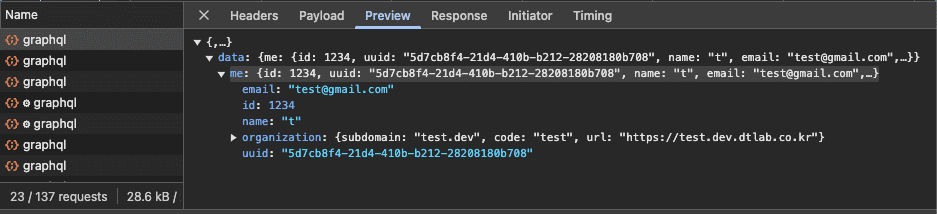
성공적으로 모킹한 것을 확인할 수 있다!
추가적으로, GraphQL의 batch기능이 모킹할 때 배열로 묶인 api 함수들의 첫 번째 api만 모킹되는 현상이 발생한다. 내가 모킹을 사용하는 환경(dev)에서는 batch기능을 꺼주도록 하자.
const batchHttpLink = new BatchHttpLink({
  fetch,
  uri,
  batchMax: process.env.NEXT_PUBLIC_ENV === 'prod' ? 0 : 1,
});
![[Ju Chan Hwang]](/static/834c8c2199bc201e56564b7b5af123a2/a12fc/profile.png)